
What is SmartPrice Check?
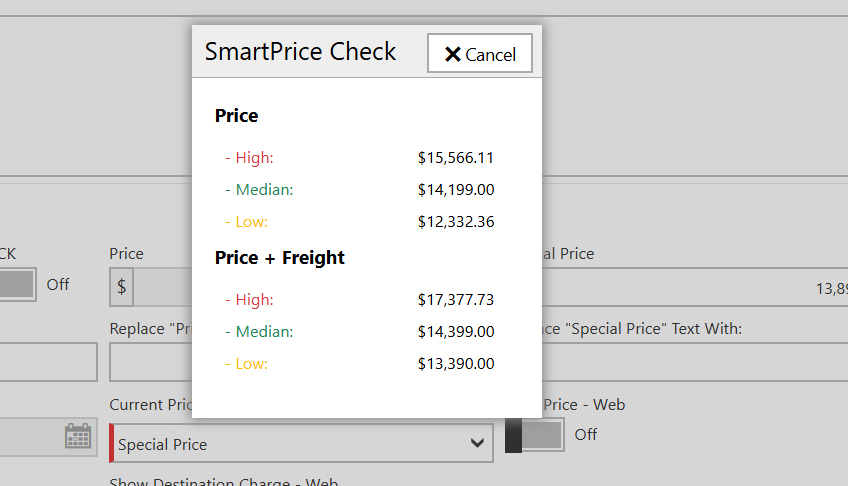
SmartPrice Check is a pricing-assist feature inside DX1 that shows you the high, low, and median sold prices for units matching the exact Year, Make, Model, and Condition you're pricing — sourced from real sold deals at other participating dealers in your geographic region over the last 24 months. It's designed to give you a fast, data-driven reference point when setting a price on a new or existing major unit.
When the conditions below are met, a SmartPrice Check link appears in the pricing area of Major Unit Management and Listing Inventory. Clicking the link opens a pop-up with the pricing summary.
Who can use it?
SmartPrice Check is available only to dealers using the DX1 DMS. It is not available to website-only dealerships.
How to turn it on or off
The feature is opt-in / opt-out at the dealership level and is on by default.
- Go to Dealership Settings → Major Unit Settings
- Locate the SmartPrice Check checkbox
- Check to enable, uncheck to disable, then save

Important: SmartPrice Check is a shared-data feature. When enabled, you both see aggregated sold-price suggestions from other dealers in your region and contribute your own sold data into the pool (anonymously, in aggregate). Disabling it opts you out of both — you will no longer see suggestions, and your sales will not contribute to anyone else's.
When will the SmartPrice Check link appear?
The link only shows when all of the following are true for the unit you're pricing:
- Your dealership is uses the DX1 DMS.
- The SmartPrice Check setting is enabled under Major Unit Settings.
- There is an exact match on Condition (New/Used), Year, Make, and Model.
Note: Color and trim modifiers are not part of the match — units of the same Year/Make/Model are compared regardless of color. - There are 3 or more sold units matching those criteria within the last rolling 24 months, from dealers other than your own, inside your region.
- Those sold units are recorded as sold on a DMS invoice.
If any one of those conditions is not met, the link will not appear on that unit's pricing screen. This is by design — the feature is meant to surface only when there's a statistically meaningful sample.
Why don't I see the link on a unit I just sold three of?
The 3-sold-units threshold is measured across other dealers in your region — your own sales count toward the data pool but do not, on their own, trigger the link for your own dealership. If you are the only dealer in your region who has sold the unit, the link will not appear until other dealers' sales push the regional total over the threshold.
What does the pop-up show?
Clicking the SmartPrice Check link opens a pop-up titled "Average prices of sold [Year] [Make] [Model] in your region," displaying:
- Dealer Selling Price (DSP): High, Low, Median
- DSP + Freight: High, Low, Median
Values are calculated from the aggregated sold data across all participating dealers in your region for the last rolling 24 months.
Region definitions
SmartPrice Check groups dealers into four U.S. regions. Pricing comparisons are limited to dealers whose primary state falls in your region.
- Northeast: CT, DE, DC, ME, MD, MA, NH, NJ, NY, PA, RI, VT
- South: AL, AR, FL, GA, KY, LA, MS, NC, OK, SC, TN, TX, VA, WV
- Midwest: IL, IN, IA, KS, MI, MN, MO, NE, ND, OH, SD, WI
- West: AK, AZ, CA, CO, HI, ID, MT, NV, NM, OR, UT, WA, WY
How often is the data refreshed?
The SmartPrice Check dataset is rebuilt by a scheduled job that runs once per day (overnight). New sold units recorded today will be reflected in SmartPrice Check calculations on the following business day.
Where you'll see the link
When the criteria above are met, the SmartPrice Check link appears in the pricing section of:
- Major Unit Management → New unit (receiving)
- Major Unit Management → Edit existing unit
- Listing Inventory
Frequently asked questions
Q: Does color or trim affect matching?
A: No. Matches are based on Condition, Year, Make, and Model only.
Q: Is my sales data shared by VIN or dealer name?
A: No. Only the aggregated price statistics (high/low/median) are visible to other dealers — never individual deals, VINs, or dealer identities.
Q: I turned on the setting but still don't see the link. Why?
A: The most common reasons, in order:
- Fewer than 3 sold units of that exact Condition/Year/Make/Model exist in your region in the last 24 months.
- The data sync hasn't run yet for sales added today (refresh tomorrow).
- Your dealership type is CMS-only — SmartPrice Check is not available on that plan.
Q: Can I see SmartPrice Check on Parts or Accessories?
A: No, the V1 release covers major units only.
Q: How do I opt out completely?
A: Uncheck the SmartPrice Check setting in Dealership Settings → Major Unit Settings. This opts you out of both viewing suggestions and contributing your sold data.
Need help? Contact DX1 Support and reference this article along with the dealership name and an example unit (Year/Make/Model) you expected to see the link on.